
AGENT DESKTOP
All customer channels, requests and reports in one window
Agent Desktop is the 3CX Cloud LT agent workspace: calls, email, Helpdesk requests, web chat, SMS, Facebook Messenger, WhatsApp and Viber — in one window. Alongside: the customer card with the full contact history, request statuses and deadlines, working time tracking, reports and AI conversation analytics.
Everything in a single window
All requests in one place — whichever channel the customer used.
- KANBANRequest managementAll requests on one board by status — you see what is new, in progress and waiting.
- TIMELINECustomer information in one placeCalls, emails and messages — one timeline on the same customer.
- MISSED CALLSMissed call handlingShows only unanswered calls, so none is left without a reply.
- AI CHATBOTAnswers without an agentIt resolves routine questions itself and hands the conversation over with full context.
- AI ANALYTICSThe call becomes textSummary, sentiment and keywords — without listening manually.
- NPSCustomer ratingsA rating after the call, and from them — one number with a trend over time.
What does the agent see when picking up?
The customer card opens together with the call, and after the call a comment and a topic remain.
- Customer cards are created and managed in the same system
- Customer information: address, services, debts and more
- Comments after the call and conversation tags
- Knowledge tree and a notice about recording inbound and outbound calls
How is the whole customer history shown?
Every contact — a call, an email, a chat or a message — stays in one customer history timeline. The agent sees what has already been discussed, so the customer does not have to repeat.
- One history timeline for all channels, not separate lists for each
- Next to every entry — the comment, the topic and who handled it
- The call recording and the correspondence are reachable from the same place
- Search by comments and tags finds the conversation you need
How are customer requests administered?
Requests, incidents and service cases are registered in one system, and their status and deadline are visible without asking around.
- Request statuses and completion deadlines with reminders
- SLA control and escalation according to rules agreed in advance
- Assignment to staff automatically by rules or manually
- Repeating actions are automated: statuses, replies, assignments
What does the request board (KANBAN) look like?
All requests are laid out in columns by status — on one screen, without filters or search. A card is moved to another column, and the same action changes the status, so nothing has to be marked separately.
- Columns are statuses: new, in progress, waiting for customer, done
- The card shows the topic and the person responsible, so nobody has to ask who is taking what
- A card is born from any channel: a call comment, an email, web chat or SMS
- The customer immediately receives an automatic confirmation that the request was accepted
- Column height shows the build-up: where the queue grows, there is the bottleneck
- The same topics and statuses roll up into reports — how many arrived and how many were resolved
How do website chats reach Agent Desktop?
Web chat messages and AI chatbot conversations arrive straight in the agent's window. The agent gets a notification and can answer right away; if the question needs work, the same chat becomes a request.
- A message from the website chat window lands where calls and emails already are
- The agent gets a notification about the new chat and sees that the customer is waiting
- The AI chatbot can answer first and, when it cannot, hands the chat to an agent with the full transcript
- A routine question is settled right in the chat — nothing extra has to be registered
- A chat that needs work becomes a request in one action, together with the whole transcript
- On the KANBAN board the request goes to a specific agent or is handed to another one with the full context
- Tasks and subtasks are created from the request when the work has to be split into steps
How are inbound and outbound calls handled?
For outbound calls the lists are loaded by import or through an integration, and inbound calls are distributed by the rules you set.
- Call lists are loaded by import or through the API from your system
- Call queues and distribution according to the rules you set
- Call recording and review from the same workspace
- Auto dialer and automatic call-backs to missed calls
Which channels are customers served on?
All channels come into the same window, so the agent does not have to jump between programs.
- Phone, email and chats in one workspace
- Web chat, SMS and social media channels, among them Facebook Messenger
- Video conferences with screen sharing, a wallboard and document sharing
- The history of every channel stays on the same customer
How are WhatsApp and Viber messages handled?
Messaging is centralised: messages are distributed to agents and the whole history is visible.
- The single-window principle and centralised messaging
- WhatsApp Business API and quick reply templates
- File and media handling and context retention
- Automatic distribution, status management and proactive notifications
How is the time actually worked shown?
Working time is recorded in the agent window itself — from login to logout, with every break.
- Login and logout time
- Breaks: away, wrapping up after a call, lunch and other pauses
- Total worked and a detailed report for every agent
- Consultant productivity monitoring and a KPI report for the manager
Which reports does the manager see?
Statistics are shown in real time, and the history lets you go back to a specific conversation.
- Real-time monitoring (switchboard / wallboard) and conversation playback
- Manager dashboards: personal and team, daily and monthly summary
- Answered, missed and called-back calls and the share that was served
- Service quality indicators: SLA statistics, queue reports, CSAT and NPS
- Export to Excel, and through the API the data feeds BI tools, among them Power BI
How is customer satisfaction measured?
After the call the customer rates the service from 0 to 9, and the NPS is calculated from those ratings: the detractor share is subtracted from the promoter share. The result is shown together with the other service reports, so nothing has to be collected separately.
- The rating is asked for automatically — by call or SMS after the conversation
- Groups: detractors 0–5, passives 6–7, promoters 8–9
- The summary shows every score, the group sizes and the total number of answers
- A gauge with zones shows where you stand, and a separate view — the trend over time
What does artificial intelligence analytics give?
Conversation transcripts are analysed automatically, without listening manually.
- Customer questions are extracted from the context of the whole conversation
- Lost sales opportunities and agent script adherence become visible
- Sentiment analysis: the emotional background and a quick read of the situation
- Priority setting, alerts for managers and long-term trend analysis
How is Agent Desktop connected to your systems?
Agent Desktop works with your phone system (PBX) and 3CX, and other systems are connected through the REST API — the agent does not need a separate tool to look data up. Whatever is not on the list is connected the same way: the scope depends on what the other system provides.
- Microsoft 365 and Outlook: contacts, calendar and email in the same place
- Microsoft Teams and the user directory (Microsoft Entra ID / Active Directory)
- CRM and ERP: MS Exchange, Salesforce, Microsoft Dynamics, Zendesk and others through the API
- REST Full API — HTTPS, JSON; passing extra information about the call
- Tailored integrations on request, the scope agreed during deployment
How do deployment and support work?
Deployment goes in stages, and after go-live the contact stays the same. The exact scope, working hours and response procedure are agreed in the contract to match the rhythm of your business.
- Stages: we discuss the process, prepare the system, go live and maintain it
- Settings are adapted to your process, not the process to the system
- Support channels: phone, email and the request system
- Every request is registered and has a status, so it is clear what is happening
- The scope of support, working hours and response procedure are fixed in the contract
How are data and user rights handled?
3CX Cloud LT access, logs and data handling rules are set during deployment and described in the contract — so that it is clear who sees what and how long records are kept.
- User rights and rolesEveryone sees only what belongs to their role. Rights are set by team and position.
- Access to call recordingsPlayback of recordings is a separate right, so it can be granted only to those who really need it.
- Action logsIt is recorded who performed an action and when — including viewing recordings. An audit trail remains.
- Deletion and anonymisationCustomer data is deleted, anonymised or pseudonymised when GDPR requires it.
- SchedulesRetention periods are set in advance, and once they expire the records are processed automatically, not by hand.
- Data storageThe storage location, retention periods and backup procedure are agreed during deployment and fixed in the contract.
How it looks in the system
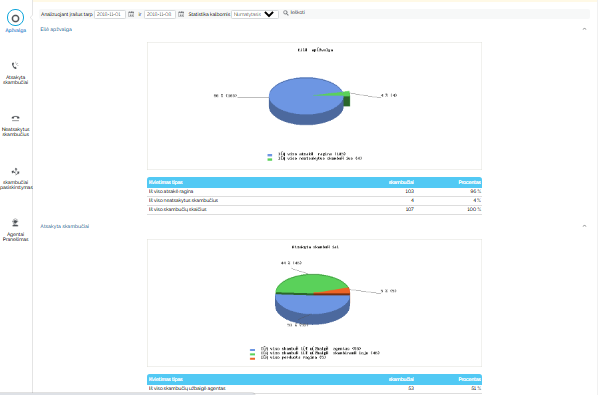
Three views from the working system — not mock-ups.


Agent Desktop — frequently asked questions
Which channels does Agent Desktop serve?
Agent Desktop from 3CX Cloud LT serves calls, email and Helpdesk requests, web chat, SMS, Facebook Messenger, WhatsApp and Viber, as well as video conferences with screen sharing. All channels are visible in the same window.
Is the whole customer history visible?
Yes. Calls, emails, chats and messages run in one customer history timeline, and next to every entry the comment, the topic and who handled it remain. The agent does not repeat questions the customer has already answered.
How are request statuses and deadlines managed?
Requests, incidents and service cases are registered in one system. Each has a status and a completion deadline with reminders, and SLA control and escalation work according to the agreed rules.
How does the KANBAN request board work?
Requests are laid out in columns by status: new, in progress, waiting for customer, done. The card shows the topic and the person responsible, and the status is changed by moving the card to another column — nothing has to be marked separately. A card is born from any channel: a call comment, an email, web chat or SMS.
Are website chats handled in Agent Desktop?
Yes. Web chat messages and AI chatbot conversations arrive in the same agent workspace as calls and emails. The agent gets a notification about the new chat and can answer right away, and the AI chatbot can answer first and hand the chat to an agent with the full transcript.
Can a chat be turned into a request?
Yes. In one action the chat becomes a request together with the whole transcript, and on the KANBAN board it goes to a specific agent or is handed to another one. Tasks and subtasks are created from the same request when the work has to be split into steps.
Are tasks assigned automatically?
Yes. Assignment can happen automatically by rules or manually, and repeating actions — status changes, replies, assignments — are automated.
Can call lists be loaded?
Yes. Call lists are loaded by import or through the API from your system, and inbound calls are distributed through queues according to the rules you set.
How is staff working time tracked?
Login and logout time, breaks — away, wrapping up after a call, lunch and other pauses — and the total worked are recorded. A detailed and KPI report is built from that.
Can the reports be exported?
Yes. Reports are exported to Excel, and through the API the data feeds BI tools, among them Power BI. Switchboard and wallboard views work in real time.
What does artificial intelligence analyse?
Conversation transcripts: customer questions, lost sales opportunities, agent script adherence and customer sentiment are extracted from the whole context. There is no need to listen manually.
Which systems does Agent Desktop connect to?
Agent Desktop works with your phone system (PBX) and 3CX. Data is exchanged with Microsoft 365 and Outlook, Microsoft Teams and the user directory (Microsoft Entra ID / Active Directory), as well as with CRM and ERP — MS Exchange, Salesforce, Microsoft Dynamics, Zendesk and others. Whatever is not on the list is connected through the REST Full API (HTTPS, JSON).
How do deployment and support work?
Deployment goes in stages: we discuss your process, prepare the system, go live and maintain it. After go-live we accept requests by phone, email and through the request system, and each has a status and a history. The scope of support, working hours and response procedure are fixed in the contract.
How is personal data handled?
User rights are set by role, actions are recorded in logs, and data is deleted, anonymised or pseudonymised in line with GDPR. Retention periods follow schedules set in advance; the storage location and backup procedure are agreed during deployment.
We will show how Agent Desktop would look in your team
Write to us which channels you serve customers on today, how you register requests and which reports you are missing — we will show how that looks in one 3CX Cloud LT window.


